
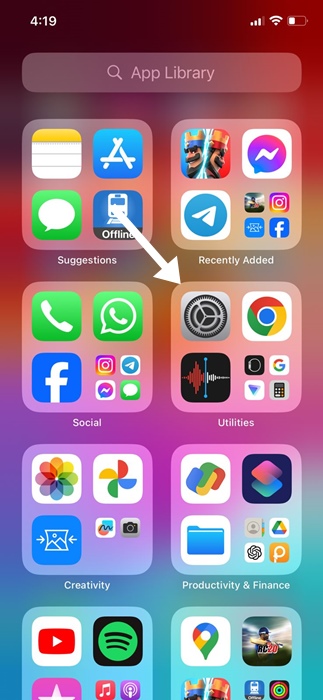
Even though iPhones enable Automatic App Updates by default, if you disabled them manually, you’ll need to turn them back on. Here’s how you can turn on Automatic App Updates on an iPhone.
1. Launch Settings.
2. Scroll down and tap App Store.
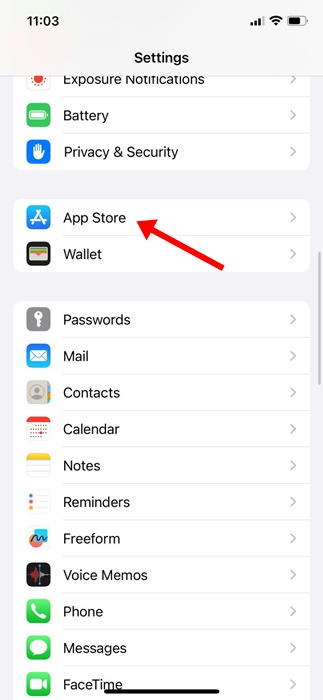
3. Enable the toggle beside App Updates.

Please note that even after enabling Automatic App Updates, your iPhone may not always install the updates immediately. So, manually check for app updates in the App Store.
How to Enable Automatic Downloads on iPhone
Automatic Download is a feature that downloads apps purchased on your other Apple Devices. Enabling this feature will make your app purchase available to all connected devices.
1. Launch the Settings app.
2. Scroll down and tap on the App Store.

3. Enable the toggle beside App Downloads.

Note: If you’re using iOS 12 or lower, you will find several options under the Automatic Downloads section. You need to turn on the sliders for Music, Apps, Books & Audiobooks, and Updates.
How to Update Apps Manually on iPhone
Even if you’ve turned on Automatic App Updates, your iPhone may not always install the updates immediately. So, it’s recommended to manually check for app updates in the App Store.
1. Launch the Apple App Store.
2. Tap on your Profile picture.

3. In the Upcoming Automatic Updates section, tap on Update All.

4. If you want to update a specific app, tap the Update button next to it.

How to Update the Stock Apps on iPhone
Your iPhone also has many stock apps like Safari, Photos, Camera, etc. You can’t update those apps from the Apple App Store. The only way to update the stock apps is to update your iPhone’s system software.
1. Launch the Settings app.
2. Tap on General.
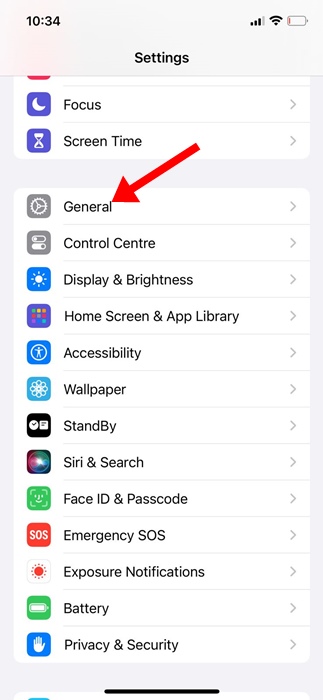
3. Tap on Software Update.

4. Tap Download and Install or Update Now.

It’s very important to keep your iPhone Apps up to date; in this way, you will have the best possible app experience. If you need more help on this topic, let us know in the comments.
The post How to Turn On Automatic App Updates on iPhone appeared first on TechViral.
from TechViral


0 Comments