
Let’s admit it, scrolling through Instagram has usually meant silent photos or loud reels. But now it looks like there’s a middle ground.
Recently, Instagram added a new feature that lets you add background music to photo carousel posts. The new feature gives static images on the platform a new layer of expression without forcing them into video format.
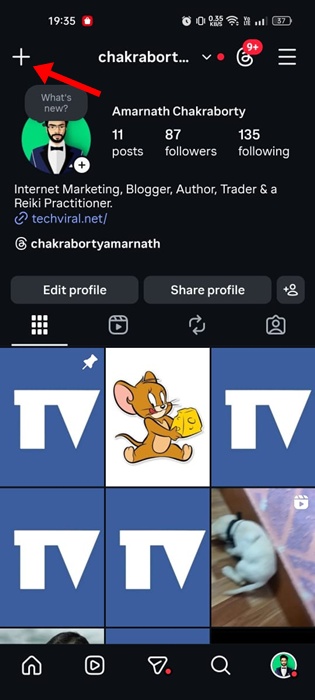
How to Create a Photo Carousel on Instagram with Background Music
So, if you’re an active Instagram user and want to make your image posts more captivating and interactive, you should definitely try this new feature. Below are the steps to add music to a photo carousel on Instagram.
1. To get started, update the Instagram app from the Google Play Store or Apple App Store.
2. Tap the (+) button.
3. Select the photos that you want to share. It should be more than one.

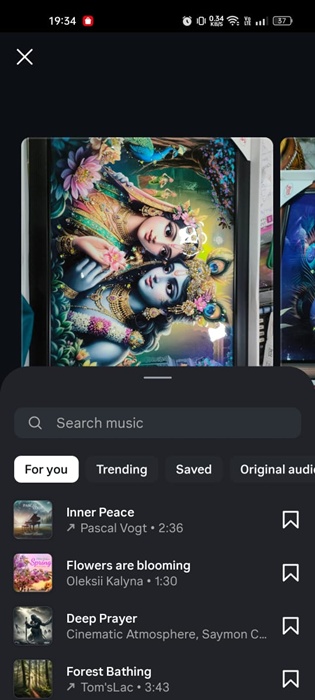
4. Tap the Audio option at the bottom toolbar.

5. Select the Music that you want to share and click Next.
6. Now customize the post as per your need and tap Share.

The post will be shared on your profile. Your followers can see the post in their feed like any other regular post. Once they interact with the post, the background music will play.
There is a variety of music options available on the app. You can pick from trending music suggestions, search for specific songs, or reuse tracks saved from previous posts.
The new feature is a clear sign that, instead of pushing everything towards reels, Instagram is making efforts to keep the photo content relevant.
This guide explains how to create a photo carousel on Instagram with background music. If you need more help in creating a photo carousel with background music on Instagram, let us know in the comments.
The post How to Create Photo Carousel on Instagram with Background Music appeared first on TechViral.
from TechViral


0 Comments