
If your phone uses an incorrect time zone, you will see the wrong time while sending and receiving messages on WhatsApp. It may even show the last seen status in the wrong date and time format.
Change WhatsApp’s 24-hour Time Format to 12-hour
WhatsApp has no dedicated option to change the date and time format; it relies on your phone’s date and time settings. Here’s how you can change your phone’s time and date settings.
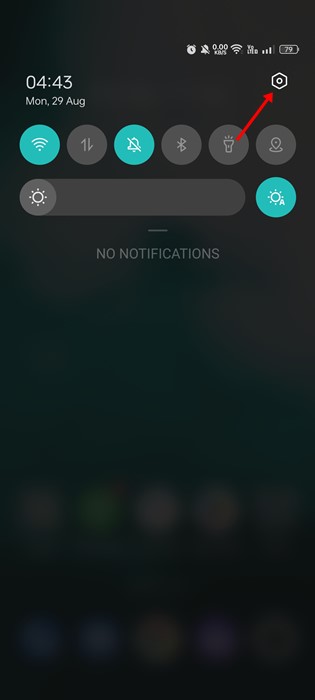
1. Pull down the notification shutter and tap the Settings gear icon.
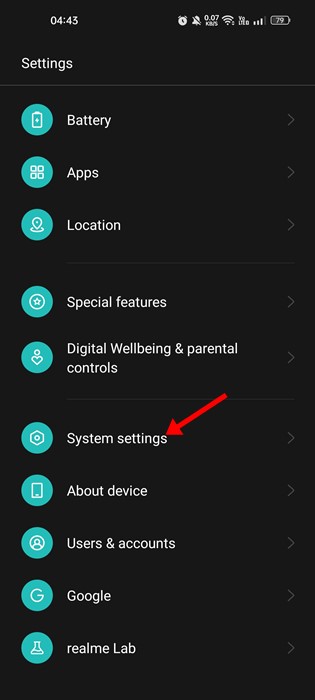
2. Scroll down to the bottom and tap System settings.
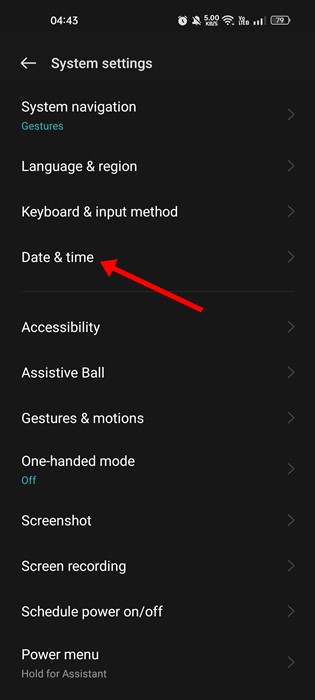
3. On the System Settings screen, tap Date & Time.
4. On the Date & time, enable the toggle for Set time automatically and Set time zone automatically.
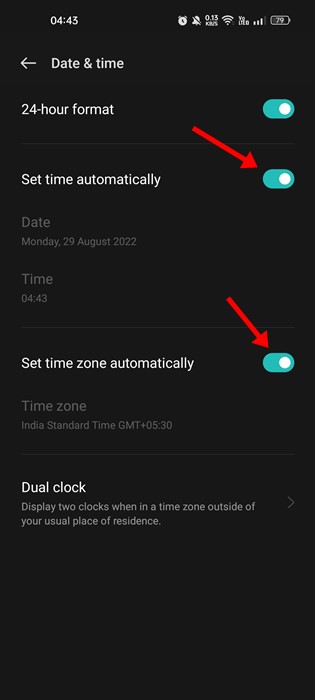
5. To change WhatsApp’s 24-hour format to a 12-hour format, disable the 24-hour format toggle.
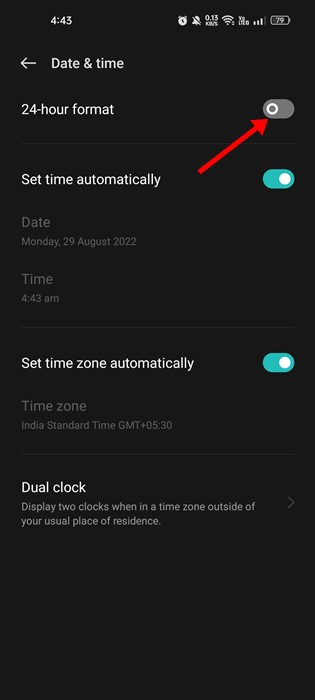
After making the above changes, restart your Android smartphone. Open the WhatsApp application and see the 12-hour format.
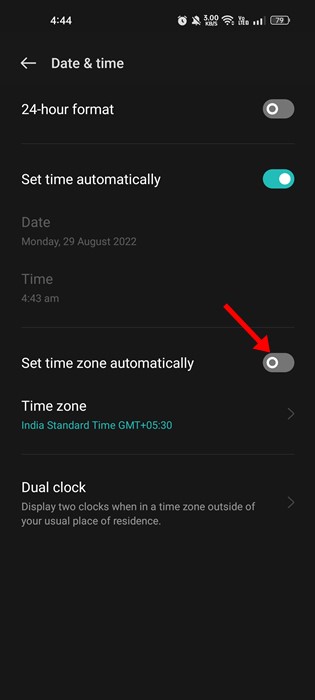
If WhatsApp still uses the 24-hour time format, open the Settings app and disable the toggle for Set time zone automatically. Once you’ve done this, restart your phone.
Change WhatsApp’s 24-hour time format to 12-hour in iOS
iPhone users also need to change the time and date format to 12-hour. On iPhone, you need to go to Settings > General > Date & Time.
You need to make appropriate changes on the Date & Time screen and restart your iPhone.
New Time Zone & Date not reflected on WhatsApp?
The new date and time format may not be reflected in WhatsApp due to the file cache and data. Hence, if WhatsApp still uses the old format even after changing the date and time format on your phone, you need to clear the app’s cache and data.
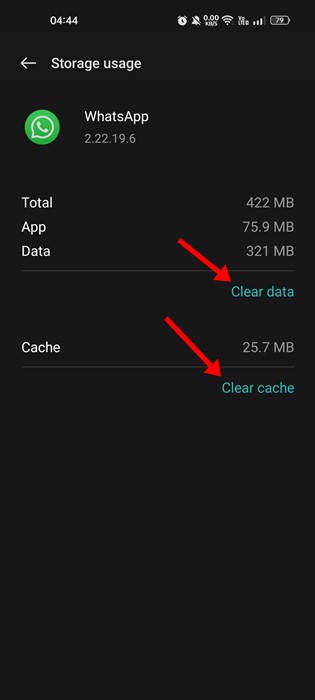
If that didn’t help, reinstall the WhatsApp application on your Android or iPhone.
Frequently Asked Questions:
How do I turn off 24-hour messages on WhatsApp?
You can turn off WhatsApp’s 24-hour format by switching to a 12-hour time format. To do that, you need to change your phone’s time and date settings.
How to fix incorrect timestamps on messages
If the timestamp on the messages on WhatsApp is wrong, you need to check your phone’s time and time zone settings and adjust them accordingly.
How to configure the timezone?
You can easily configure the timezone by heading to Settings > System Settings > Date & Time. It’s recommended that you turn on the ‘Set time zone automatically’ feature.
How do I adjust my WhatsApp date and time?
The WhatsApp app does not allow you to adjust the date and time manually. You must change the date and time on your phone, and it will be reflected on the WhatsApp app.
Also read: Best WhatsApp Hacks & Tricks
These are some simple steps to change WhatsApp’s 24-hour time format to a 12-hour format. If you need more help fixing incorrect timestamps on WhatsApp messages, let us know in the comments below.
The post How to Change WhatsApp 24-hour Time Format to 12-hour appeared first on TechViral.
from TechViral


0 Comments